
Free Camera Gear Inventory Template
Add cameras, lenses, lighting, audio, and accessories. Record serial numbers and purchase details, then download a clean CSV.
- No account required
- Saved only in this browser
- Print, copy, or export
Records
0/ 0 CSV-ready
Purchase total
$0.00
Replacement total
$0.00
Loading your saved draft…
How to use it
Method, limits, and references.
What to record
Start with the details that identify an item and help you replace it: category, brand, model, serial number, purchase date, price, and current replacement estimate.
- Use one row for each camera, lens, light, audio device, support, bag, or accessory.
- Keep receipts and clear item photos outside the spreadsheet, then note where those files live.
- Update replacement estimates when prices or your kit change.
What happens to this draft
The table runs in your browser. GearDex does not receive its contents when you add rows, calculate totals, print, or download the CSV.
The export is shaped for a spreadsheet and can also serve as a starting point for GearDex. Read the comparison between a camera inventory spreadsheet and dedicated software.
A useful insurance record
An inventory can make a coverage conversation and later documentation easier, but a list alone does not establish coverage or guarantee a claim.
Use the photography equipment insurance checklist to prepare the next questions.
Keep it current
- Add new equipment as soon as it arrives.
- Record sold, lost, or retired gear instead of silently deleting the history.
- Keep a second copy somewhere you can reach if the primary location is damaged or stolen.
References
Questions
Does GearDex see what I type into the template?
No. The table runs in your browser. GearDex does not receive its contents when you add rows, calculate totals, print, or download the CSV.
What should I record for each item?
The details that identify an item and help you replace it: category, brand, model, serial number, purchase date, price, and a current replacement estimate.
Why are some rows left out of the CSV?
A row needs at least a brand and a model to be exported. Incomplete rows stay in your draft and are flagged above the table.
Is an inventory list enough for an insurance claim?
An inventory can make a coverage conversation and later documentation easier, but a list alone does not establish coverage or guarantee a claim.
Can I bring the CSV into GearDex later?
Yes. The export is shaped for a spreadsheet and can also serve as a starting point for a GearDex inventory.
Track this automatically in GearDex
Create your GearDex inventory
Your draft stays in this browser while you create a free workspace. One searchable home for every camera, lens, light, and accessory, with specs, serial numbers, photos, and purchase history.
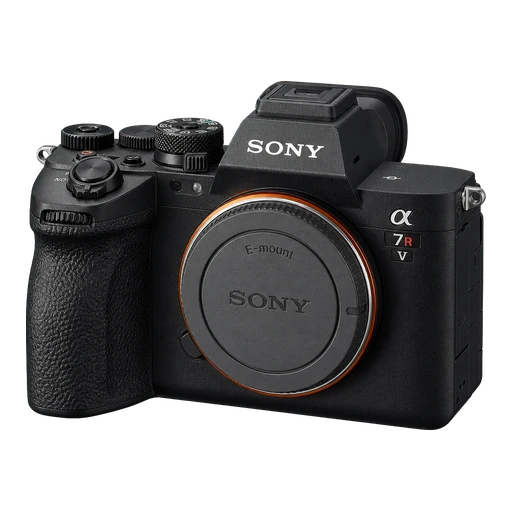
Camera · Sony
Alpha 7R V
- Serial number
- 5031842
- Mount
- Sony E
- Sensor
- Full frame · 61MP
- Weight
- 723 g
- Purchased
- Mar 14, 2024
- Price paid
- $3,898
- Market value
- $3,120
- Location
- Studio · Cabinet B
More free tools
All toolsInsurance checklist
Document your kit and prepare the right questions for an insurance professional.
Open toolDepreciation calculator
Model an equipment value curve without pretending it is a live resale appraisal.
Open toolLens maintenance schedule
Create a conservative lens-care routine based on use, dust, moisture, and travel.
Open toolShoot packing list
Build a tailored gear checklist for portraits, weddings, products, landscapes, or sports.
Open toolShutter count checker
Read a camera's shutter count from one original photo, privately, in your browser.
Open tool



Stop managing gear with spreadsheets.
Join 900+ photographers, studios, and rental houses who already run their kit on GearDex.
- Free forever plan
- No credit card
- Import from CSV
- Mac & web