

Camera Lens Compatibility Checker
Will this lens fit your camera? Check the mount, sensor coverage, and adapter requirements for common mirrorless systems.
- No account required
- Checks run in your browser
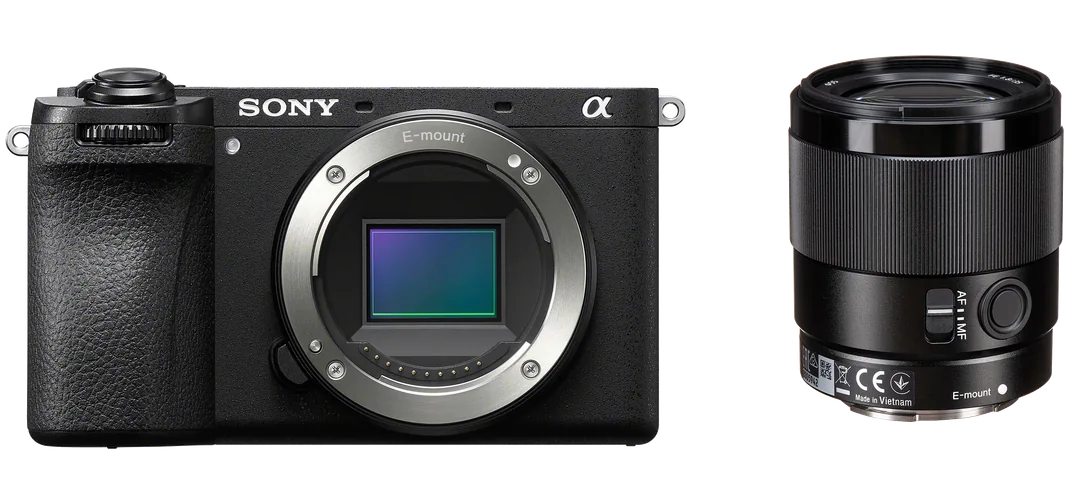
Compatibility
Check the fit
Pick a camera and lens to see if they mount directly, need a crop, or need an adapter.
How to use it
Method, limits, and references.
Find the mount on your camera and lens
Choose a listed model or select its mount and sensor format. The camera manual lists the body mount. For a lens sold in multiple versions, check the mount printed on the box or product listing for that exact copy.
The checker covers Sony E, Canon RF, Nikon Z, Fujifilm X and G, Micro Four Thirds, and L-Mount cameras. The lens list also includes legacy mounts such as Canon EF, Nikon F, and Sony A for supported mirrorless adapter paths.
When a lens fits but the image crops
Sony E and FE share a mount. For example, the Sony E 16–55mm F2.8 G mounts directly on a Sony α7 IV, where APS-C/Super 35 mode uses a smaller part of the sensor. A full-frame FE lens also mounts on an APS-C Sony body and covers its whole sensor.
Canon RF-S on a full-frame EOS R body uses a 1.6× crop. Nikon Z DX on a full-frame Z body uses DX crop mode, about 1.5×. Use the crop factor calculator to see how this changes framing.
Using DSLR lenses on mirrorless bodies
Canon EF and EF-S lenses use the EF-EOS R adapter on EOS R cameras. An EF-M lens is a different design and does not work with that adapter.
Nikon’s FTZ and FTZ II support many F-mount lenses on Nikon Z. Check Nikon’s table for the exact lens because autofocus depends on the lens generation. Sony LA-EA adapters have their own body, lens, and firmware requirements.
Mount fit and sensor coverage are the two things this checker evaluates. Check the manufacturer for autofocus, stabilization, teleconverters, and firmware, especially with third-party lenses or adapters.
Which lenses fit the Sony a6700, Canon EOS R7, and Nikon Z50II?
The Sony a6700 has an APS-C sensor and takes Sony E and FE lenses directly. An FE 35mm F1.8 covers the entire sensor and frames like roughly a 52.5mm lens on full frame. A used listing for a Sony 35mm f/1.8 could also be the APS-C E 35mm F1.8 OSS. Both mount on the a6700, but their coverage differs if you later move to a full-frame Sony body. Sony E and FE compatibility.
The Canon EOS R7 accepts both RF and RF-S lenses directly. If you already own a Canon EF 50mm f/1.8 STM, select Canon EF in the checker to see the EF-EOS R adapter path. A Canon EOS M lens marked EF-M uses a separate mount and cannot use that adapter. Canon EOS R system.
The Nikon Z50II takes Z lenses directly, including Z DX lenses designed for its APS-C sensor. If you are bringing over a Nikon DSLR lens, check the full name, including prefixes such as AF-S or AF-P, in Nikon’s FTZ chart. The exact lens determines which features work through the adapter. Nikon FTZ II compatibility.
Check lens compatibility before buying used
Ask the seller for a photo of the mount end and the model code if the listing only shows focal length and aperture. A third-party lens can have the same name in Sony E, Nikon Z, or Fujifilm X versions. Check the mount on the exact copy before ordering an adapter or buying a body to use with it.
If the checker reports a crop, decide whether the narrower view works for the shoot. If it reports an adapter, look up autofocus, stabilization, and firmware support for that pair. For a used body, check its condition and service history separately. You can run a camera shutter count check if the seller can send an original photo from the camera.
Camera and lens compatibility examples
| Camera | Lens | Fit |
|---|---|---|
| Sony α6700 | Sony FE 35mm F1.8 | Fits directly |
| Sony α7 IV | Sony E 16–55mm F2.8 G | Fits in crop mode |
| Canon EOS R6 Mark II | Canon EF 50mm f/1.8 STM | Adapter needed · Canon EF-EOS R |
| Fujifilm X-T5 | Nikon NIKKOR Z 40mm f/2 | Different mounts |
References
- Sony E / FE lens and body compatibility
- Canon EOS R system and lens mounts
- Nikon DX and FX formats
- Fujifilm interchangeable lens compatibility
- Micro Four Thirds standard and cross-brand compatibility
- L-Mount Alliance standard
- Canon Mount Adapter EF-EOS R
- Nikon FTZ and FTZ II lens compatibility table
- Sony A-mount to E-mount adapter compatibility
Questions
How can I tell if a lens will fit my camera?
Compare the camera mount with the mount of the exact lens version. A matching mount usually fits directly. Then check whether the lens covers the camera’s full sensor and whether autofocus or stabilization needs specific firmware.
Can I use a Sony FE lens on a Sony APS-C camera?
Yes. Sony FE lenses share the Sony E mount and cover the smaller APS-C sensor. An APS-C E lens on a full-frame Sony body typically uses APS-C/Super 35 mode instead.
Do Canon EF and EF-S lenses fit Canon RF cameras?
Compatible EF and EF-S lenses attach with Canon’s EF-EOS R mount adapter. EF-S lenses use a 1.6× crop on full-frame EOS R cameras. The adapter does not take EF-M lenses.
Can I use a Nikon F lens on a Nikon Z camera?
Many Nikon F lenses work with an FTZ or FTZ II adapter. Check the exact lens in Nikon’s compatibility table because autofocus, metering, and physical compatibility vary by lens generation.
What if my camera or lens isn’t listed?
Choose the mount and sensor format instead of a model. After checking the pair, you can enter your exact camera and lens names in GearDex before saving them.
Track this automatically in GearDex
Save your camera and lens
Carry your camera and lens into GearDex to review and save them in your gear library. One searchable home for every camera, lens, light, and accessory, with specs, serial numbers, photos, and purchase history.
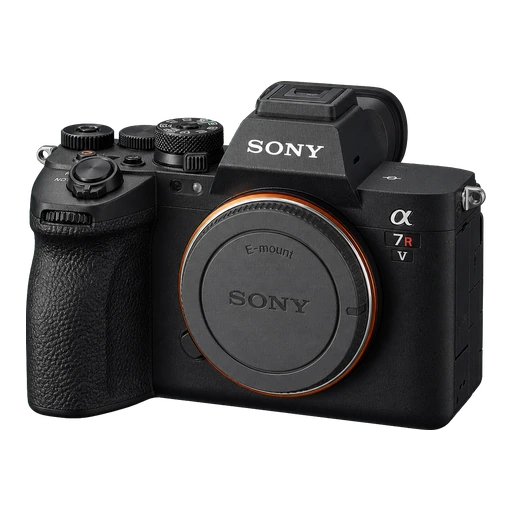
Camera · Sony
Alpha 7R V
- Serial number
- 5031842
- Mount
- Sony E
- Sensor
- Full frame · 61MP
- Weight
- 723 g
- Purchased
- Mar 14, 2024
- Price paid
- $3,898
- Market value
- $3,120
- Location
- Studio · Cabinet B
More free tools
All toolsGear inventory template
Build a private equipment list in your browser and export it as a spreadsheet.
Open toolInsurance checklist
Document your kit and prepare the right questions for an insurance professional.
Open toolDepreciation calculator
Model an equipment value curve without pretending it is a live resale appraisal.
Open toolLens maintenance schedule
Create a conservative lens-care routine based on use, dust, moisture, and travel.
Open toolShoot packing list
Build a tailored gear checklist for portraits, weddings, products, landscapes, or sports.
Open toolShutter count checker
Read a camera's shutter count from one original photo, privately, in your browser.
Open toolPricing calculator
Turn your costs and the pay you want into a minimum price per shoot, a day rate, and an hourly rate.
Open toolCrop factor calculator
See what a lens becomes on another sensor: equivalent focal length, aperture, and angle of view.
Open toolGolden hour calculator
Golden hour, blue hour, sunrise, and sunset for any date and place, worked out on your device.
Open tool







Stop managing gear with spreadsheets.
Join 300+ photographers, studios, and rental houses who already run their kit on GearDex.
- Free forever plan
- No credit card
- Import from CSV
- Android, Mac, Windows & web