How to Catalog Camera Gear for Insurance: The Evidence Checklist
Create an insurance-ready camera gear catalog with serial numbers, receipts, item photos, values, locations, and a record you can export when needed.
 Dylan AndersenPublished 9 min read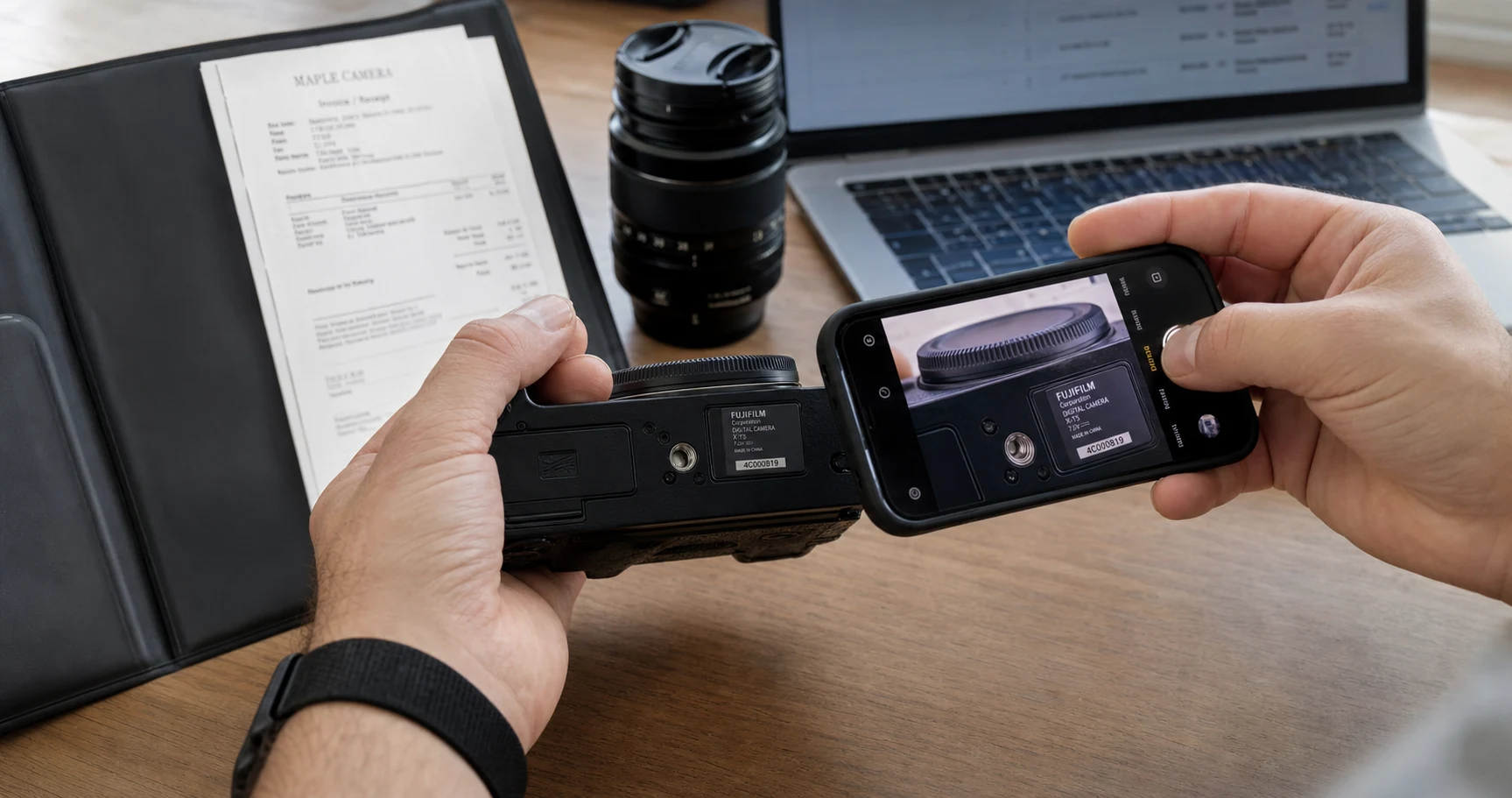
In this guide
- What information belongs in a camera insurance inventory?
- How should you photograph gear for proof of ownership?
- What if you no longer have the original receipt?
- Where should camera inventory records be stored?
- How often should you update a photography equipment insurance list?
- Frequently asked questions
The short answer
An insurance-ready camera gear catalog should identify each item and preserve evidence of ownership. Record the exact model and serial number, purchase details, receipt, clear item and serial photos, current location, condition, and a sensible value reference. Store the catalog away from the gear itself and review it whenever the kit changes.
What information belongs in a camera insurance inventory?
Build the record so a person who has never seen your kit can identify each item without guessing. “Black Fuji camera” is weak. “Fujifilm X-H2S, body serial 3A0XXXXX, purchased from the named retailer on the recorded date” is specific and verifiable.
Policy requirements differ, so ask your insurer or broker what documentation they expect before you rely on any template. Your inventory is an evidence package, not a promise that a claim will be covered.
- Exact identity
- Category, manufacturer, full model name, serial number, and distinguishing notes.
- Ownership evidence
- Receipt or invoice, seller, order number, purchase date, and purchase price.
- Visual evidence
- A full item photo, a readable serial-number photo, and condition photos for high-value pieces.
- Value context
- Original cost, current estimate or replacement reference, currency, and the date reviewed.
- Current status
- Primary location, loan status, maintenance status, and any relevant damage.
How should you photograph gear for proof of ownership?
Use plain, well-lit photos that favor evidence over style. Photograph the whole item, then make a second frame where the serial number is sharp and readable. Capture permanent markings on the equipment rather than relying only on a box label.
Keep original files. A cropped web image may be convenient in the inventory, but the full-resolution original preserves more context. For a body with visible wear or a lens with a small dent, add a condition photo so the pre-existing state is clear.
- 01
Clean the label
Dust and glare can hide small engraved or printed serial numbers. - 02
Use soft side light
Angle the light so engraved characters have contrast without a hard reflection. - 03
Frame the whole item
Capture the body or lens with enough surrounding detail to identify it. - 04
Make the serial close-up
Check focus at full size before putting the gear away. - 05
Match files immediately
Attach the images to the correct item record while the camera is still in front of you.
What if you no longer have the original receipt?
Look for retailer account history, emailed invoices, payment records, manufacturer registration, repair invoices, and dated photos. Ask the seller whether they can reissue a receipt. Record what you found and where it came from.
Do not invent a purchase date or price to fill a blank. Mark the field as unknown and add the strongest evidence you can recover. Your insurer can tell you which alternatives it accepts.
Where should camera inventory records be stored?
Keep the record somewhere you can reach if the studio, bag, or computer is unavailable. A cloud-based catalog helps separate the evidence from the physical equipment. Keep a periodic export in another controlled location as a second path.
Protect access with a strong unique password and multi-factor authentication where available. Serial numbers, receipts, addresses, and equipment values are sensitive business records. Share them only with people who need them.
| Record | Primary copy | Backup check |
|---|---|---|
| Item details | Camera inventory system | Periodic structured export |
| Receipts | Linked to the item | Original email or secure file archive |
| Item photos | Linked evidence images | Original full-resolution photo library |
| Policy | Document library | Insurer portal or secure archive |
| Contact details | Policy notes | Offline emergency reference |
How often should you update a photography equipment insurance list?
Update the catalog when you buy, sell, trade, loan, or retire equipment. Review the complete list before a policy renewal and before major travel or production. Confirm that the total you are insuring still reflects the gear you own and the valuation method in the policy.
GearDex keeps receipts, warranty files, insurance documents, values, locations, loans, and maintenance connected to item records. Use reports and exports to review the catalog, then confirm coverage questions with your insurer.
Frequently asked questions
Do camera insurance records need serial numbers?
Serial numbers are one of the strongest ways to distinguish a specific camera or lens from the same model. Ask your insurer which proof it requires for your policy.
Should I photograph camera gear boxes for insurance?
Box labels can support the record, but photograph the serial number on the equipment itself whenever possible. Boxes can be separated from the item or carry different identifiers.
How do I value used camera gear for an insurance list?
Follow the valuation method in your policy. Record the source and review date for any estimate, and ask the insurer whether it uses replacement cost, agreed value, or another basis.
Is a cloud camera inventory enough for an insurance claim?
A cloud inventory organizes evidence, but claim requirements and coverage depend on the policy. Keep original receipts and photos, maintain backups, and confirm expectations with the insurer.